
Now through September 13, 2026 - Fitness Lab 30% Off Labor Day Sale!
Exclusive to email subscribers (link will be in your welcome email)
Click here to join the list and get 30% off lifetime on Fitness Lab
Fitness Lab Release Notes
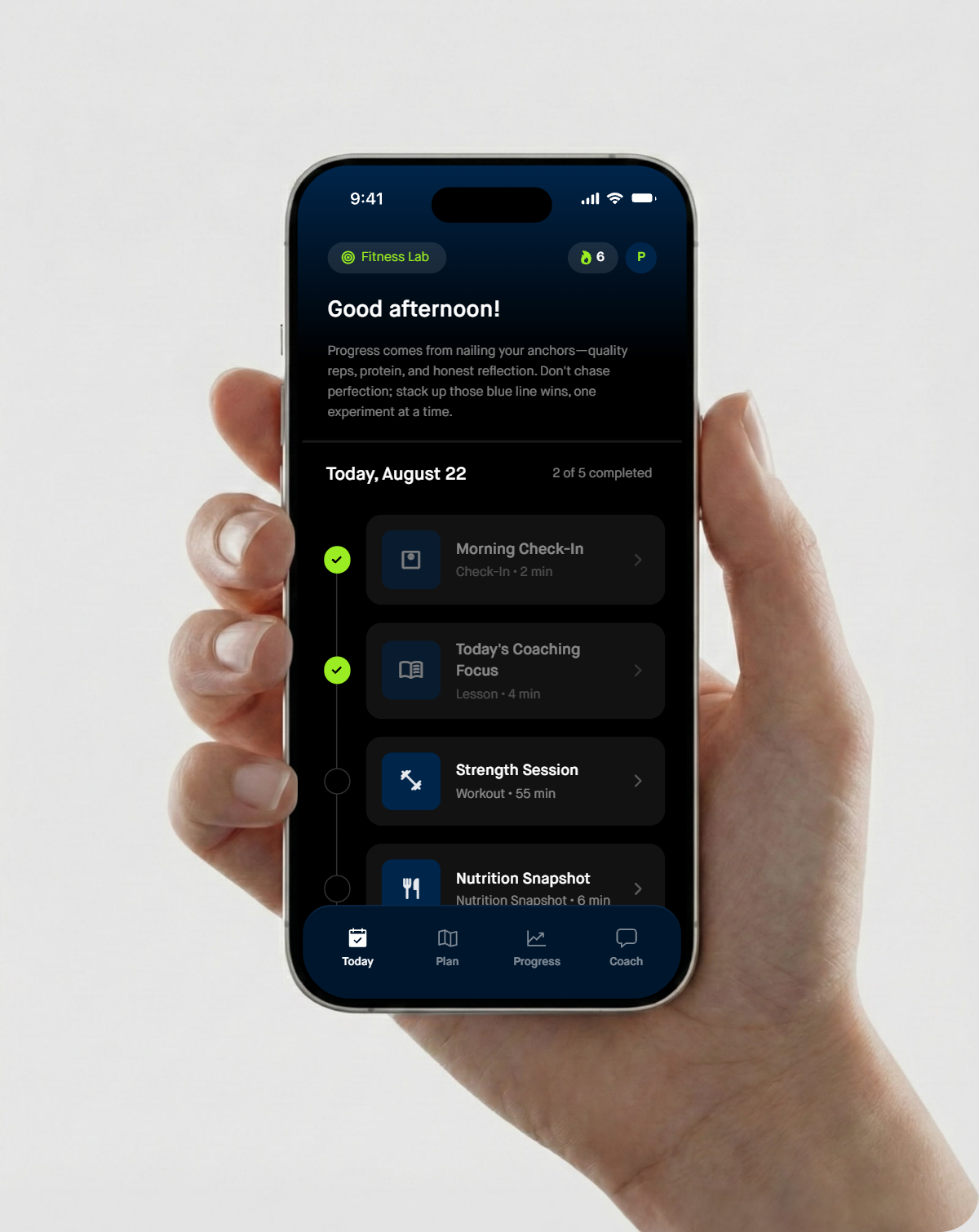
Fitness Lab is always improving, so we created this page to organize major new features by release date.
Every entry covers changes to that release and what they mean for your daily experience as a user.
If it’s on this page, it’s already live!
Most updates get pushed to you seamlessly without needing to update the app version. The app rebuilds your activities overnight, so a new feature usually shows up the next morning. A few changes might need an update from your Apple or Google App Store.
The archive below goes back to November 2025 when we launched Fitness Lab, with the latest version at the top.
-
Curated Programs, Structured Program Design, and Conditioning Sessions
Curated programs
A third way to train. Alongside having Fitness Lab build your program or following your own, you can now choose a curated program written by Philip and have the app deliver it session by session. Browse the catalog and filter by days per week, level, goal, and equipment.
Eleven programs available at launch. CHISEL, IGNITE, IRONCLAD, VELOCITY, Intermediate 3-Day, Intermediate 4-Day, Late Novice 4-Day, Novice 3-Day Strength, Novice 3-Day Physique, Glutes and Legs 4-Day, and a Travel collection. Each listing shows its structure, block length, level, goal, equipment, and how many of its exercises have matching demonstration videos.
You see the whole program before you commit. Confirmation shows the weekly structure, source notes, progression instructions, block length, and any equipment or joint conflicts, along with substitutions you approve up front.
We do NOT discover or apply a substitution silently once you are mid-session.
The program is delivered as written. The source owns the split, exercise selection, sets, reps, intensity, progression, rest, and block length. Per-exercise notes such as "heavy, maintain load" are shown and followed rather than overridden by the app's own progression logic.
We do NOT auto-increment loads on a curated program. Where a program specifies exact progression, the app shows you the rule, your last result, the suggested change, and why, and you accept, edit, or keep your current load.
Your schedule is yours. If a program calls for four days and you train three, you choose: change your training days, pick a different program, or run the program more slowly across the days you have. The slower option delivers every session in order and simply takes longer.
We do NOT compress, combine, drop, or reorder sessions to fit a calendar.
The clock follows you, not the calendar. Program weeks advance when you complete a session. A missed day does not skip a session or push you forward. If a day is busy or your readiness is low, the app offers to shift or defer rather than quietly cutting your session down.
Learning and training run independently. Your Fitness Lab phase advances on what you have learned. Your program advances on sessions completed. Neither interrupts the other, and the Plan tab shows both when they differ.
You choose what happens at the end. Finish a block and you decide whether to repeat it, pick another program, or return to app-generated programming. Nothing repeats or replaces itself automatically.
How app-generated programs are built
Programs generated by Fitness Lab now follow an explicit rule set rather than being assembled case by case. The parts you will notice:
Training level, assessed and revisited. You are classified as rank beginner, novice, intermediate, or advanced from your experience, your age, and your first working loads, then reclassified from what actually happens in your sessions. Level can differ by lift. Advanced is never assigned from onboarding answers alone.
A weekly structure matched to your days and your session length. Two days through six days each map to a specific structure appropriate to your level and goal. Sessions under 30 minutes use a minimalist structure of two or three exercises rather than a compressed version of a longer session. Weekend-only and back-to-back training days are handled explicitly.
Progression that matches where you are. Novices add load session to session. Intermediates progress week to week through double progression, a top set with back-off sets, or a heavy, light, and medium weekly wave, depending on the structure. Stall twice on a lift and that lift moves to the next progression model.
Deloads, planned and reactive. Blocks run four to six weeks followed by a deload. A deload can also arrive early when lifts feel harder at the same load two sessions running, effort creeps up at the same load across two weeks, soreness sits at 7 or higher for three days, or your recovery scores fall alongside flat performance. A deload keeps your days and your movements, cuts working sets by about half, and stays at 80 to 90 percent of your loads.
We do NOT prescribe a deload as complete rest unless you are ill or injured, and we do NOT frame it as a setback.
Volume targets by level. Weekly hard sets per muscle group scale from 6 to 10 for beginners up to 12 to 20 for advanced lifters, always starting at the low end of a new block. Warmup guidance never counts toward that total.
Substitution by pattern. A cranky knee, hip, low back, shoulder, or elbow changes the exercise, not the movement pattern. Pain that persists past two sessions with modification brings up the clinician conversation.
Programming that accounts for who you are. Separate rules apply for lifters 40 to 59, 60 and older, and 70 and older, for perimenopause and postmenopause, for TRT, for weight loss medications, for returning after a layoff, for deconditioned lifters, and for hypermobility, hypertension, type 2 diabetes, and osteoarthritis.
We do NOT build a separate menopause program or apply calendar-based cycle syncing, because the evidence does not support it. Standard programming with heavy compound work, moderate-rep hypertrophy work, and symptom-based autoregulation on hard days is the approach.
We do NOT under-program lifters under 40 just because the app's usual audience is older.
Conditioning
Conditioning Sessions. A new activity for users whose conditioning preference calls for it. Guided aerobic or interval work with a clear target, an intensity cue, an optional heart rate range, and a short completion log. 20 to 45 minutes, fitted inside your usual session length.
Intensity in plain language. Easy means you can speak in full sentences. Moderate means short sentences. Hard means a few words. Heart rate ranges appear only if you have connected heart rate data and want them.
Progression that starts with time. Easy sessions grow by 5 to 10 minutes per week before frequency or intensity changes. Interval sessions add a round every week or two.
Prepared before intense. Beginners, deconditioned lifters, and anyone 60 or older start with easy sessions of 15 to 20 minutes and do not receive interval work until four weeks of easy work with stable recovery. Cycling, rowing, and incline walking come before running intervals. Knee, hip, or low back limitations change the modality.
Cardio scheduling replaced blanket interference warnings. Beginners and novices, and anyone training for general health or body composition at moderate volume, can schedule cardio freely with no precautions. Separation rules apply only to intermediate and advanced lifters with a strength or muscle gain priority.
Evening Debrief
Tomorrow's Training Plan. Your evening check-in now opens with what you are training tomorrow, listed exercise by exercise with the prescribed sets and reps. Curated programs show the source session name and any special notes. Rest days say so plainly. Loads and effort targets are still set in the morning based on your readiness.
Resources and recommendations
A published policy for affiliate recommendations. Recommendations can now appear only in Coach chat, the Weekly Lab Review, and the resource library. They are prohibited in daily coaching, your morning and evening check-ins, Nutrition Snapshot, Weekly Fuel Plan, training sessions, Progress, and notifications.
Most partners are request-only. With one exception, a partner is mentioned only if you raise that category or ask for a recommendation in it, and never more than one at a time.
Plain disclosure. The first time an affiliate link or code appears in a surface on a given day, the app says that Philip earns a commission at no extra cost to you.
We do NOT use your hunger scores, weight trend, sleep data, digestion ratings, symptoms, or biofeedback as a reason to recommend anything, and we do NOT connect an affiliate recommendation to your logged data.
We do NOT make affiliate recommendations to users who have signaled a difficult history with tracking, dieting, or restriction, or in any response about hunger, appetite, cravings, energy, symptoms, hormones, medication, labs, pain, injury, distress, or body image.
No affiliate product is ever presented as treating or improving a symptom, condition, or biomarker.
Educational resources are education, not prescription. Guides in the resource library never override your program. When a guide names a specific dose, rest period, or block structure, the app's rules and your program still govern what you are actually prescribed.
Fixes
Podcast episodes bound to real records. Each Deep Dive is now tied to a specific episode from the saved feed, with its audio resolved from that same record, and the player must render before any reflection prompt. If an episode cannot be bound or played, the activity is not delivered as a text-only page.
-
Workout Logging, Exercise Library, and Session Time Budgets
Workout logging
Set-by-set logging. Every prescribed exercise opens its own workout logger. Each working set shows what the program calls for and your most recent comparable performance, with a clear way to mark it complete and optional adjustments for reps, load, effort, and notes. Confirming your sets and answering two or three coaching questions is enough to complete a session.
Completing a set saves a record. The exercise list is navigation only.
Intelligent prefill. Prefilled values reflect what the program calls for today, including reduced loads during a deload week and conservative loads after a break, illness, travel, or a change in movement variation.
Prefill is never a blind copy of your last session.
Rep ranges. Sessions support fixed prescriptions, such as three sets of five at the same load, and rep ranges, such as three sets of eight to twelve. Both can appear in the same session.
Load is optional. You can confirm or adjust reps and load in seconds. Load is useful but never required, and units follow your locale or your selected preference, with easy switching between pounds and kilograms.
Structured effort rating. Each exercise includes an optional 1 to 10 effort selector alongside reps and load, saved with the set rather than typed as free text.
Last time summary. When you have a comparable prior record, the logger shows your previous sets, reps, load, and effort rating.
One note field per exercise. A single optional field, labeled "Any pain, technique issue, or setup change?", covers what reps, load, and effort cannot. There are no separate per-set fields for fatigue, soreness, confidence, or form quality. Fields such as distance, time, or cadence appear only on movements that genuinely need them.
Comparative difficulty, more selectively. The app now asks whether a movement felt easier, about the same, or harder than last time for only two or three deliberately chosen movements per session, prioritizing your main lifts and any movement with a pending progression decision. Progression on other movements is guided by your confirmed sets.
Untimed sets. Strength sets have no countdown, no preparation timer, and no timed start prompt. You perform the set and mark it complete when you are ready. Only movements with a genuine duration prescription, such as planks, dead hangs, loaded carries, and timed intervals, show a duration.
Rest is guidance, not a gate. The app shows a recommended rest period and never advances on its own.
Plain-language effort scale. Effort is explained in reps you had left rather than jargon: 10 means no reps left, 9 means one left, 8 means about two, 7 means about three, and 6 or below means four or more.
Effort is neutral context, not a score. It is read alongside your actual reps and load to decide whether to hold, progress, reduce, or repeat.
End-of-session reflection. After your working sets, one short optional prompt covers how your energy felt, any milestone worth marking, and anything worth remembering for next time. It does not repeat your Evening Debrief questions.
First-time exercise setup
Starting load calibration. The first time you reach a movement with no comparable history, the app asks what load you have been using recently, while you can see the movement, the prescription, and your equipment. If you are newer to lifting, or you skip the question, it proposes a conservative starting load as a calibration set to confirm or adjust.
You are never left facing an empty load field.
Sanity checks on entered loads. Before an entered starting load is saved, the app checks it against the movement, your body weight, your stated experience, and your selected unit. Likely pound and kilogram mix-ups or entry errors prompt a quick confirmation rather than propagating into future recommendations.
Equipment-aware increments. Load increments are inferred from the equipment you described during onboarding, whether that is a commercial gym barbell, microplates, fixed or adjustable dumbbells, or a cable stack. The assumption updates automatically when your logged loads suggest a different increment, and you can correct it directly in the exercise flow.
Exercise Library
A single source for demonstrations. Exercise demonstrations now come from a maintained Exercise Library rather than from selected YouTube videos and generated images. When a demonstration exists, the thumbnail in your session list, the exercise preview, and the demonstration itself all come from that same record.
Your program is chosen first, demonstrations second. The library never narrows which exercises you can be assigned. The app selects the movement your program calls for, then checks whether matching demonstration media exists.
We do NOT substitute a different exercise, thumbnail, or demonstration to fit the library. No media is always preferred over the wrong media.
Specific prescriptions stay specific. If your program calls for a dumbbell Romanian deadlift and the library has no entry for it, you still get a dumbbell Romanian deadlift with written cues and warmup guidance, rather than a different variation that happens to have a video.
Asked, not guessed. When a broad prescription such as "barbell squat" could reasonably mean more than one thing, the app uses your history or your stated preference, and asks once if neither settles it. Your answer carries forward.
Focused form cues. Each exercise gives roughly two or three high-value cues aimed at what most changes execution, rather than a wall of technique text.
Session length
Sessions built to your time budget. Programs are now built from your training days and your typical session length together, rather than inferring session length from how often you train. A three-day schedule with a 30-minute budget produces a different program from a three-day schedule with a 90-minute budget.
Time-appropriate rest. Recommended rest scales with your session budget. Under 45 minutes, roughly 2 to 3 minutes after compound movements and 60 to 90 seconds after accessories. Between 45 and 60 minutes, roughly 3 to 4 minutes and 90 to 120 seconds. Between 60 and 90 minutes, roughly 3 to 5 minutes and 2 to 3 minutes.
When a session will not fit, we remove movements or working sets. We do NOT compress rest below the recommended range to fit more work.
Readiness and session adjustment
Readiness check before training. Before a scheduled session, the app reads your Morning Check-In energy rating alongside available sleep, resting heart rate, and recent activity trends, and recommends one of four options: proceed as planned, keep the session but remove accessory volume and hold progression, switch to a low-stress recovery session, or move the session to the next suitable day.
The least disruptive option comes first. A day that is simply too full gets the shortened session. Low readiness gets a reduced-volume, technique-focused session. Recovery or a shift is recommended only when several signals agree, such as very low energy alongside short sleep or unusually high soreness.
You confirm every adjustment. We do NOT change your schedule automatically.
Works without connected data. If sleep or heart rate data is unavailable, your own check-in is the fallback. The app never assumes connected data is present.
Form checks
Form checks moved out of the workout. Recording a form check is no longer a control inside the exercise logger. It is now its own activity, and your written cue sheet and demonstration handle setup and execution during the session itself.
Offered for a reason. The Form Check activity appears when there is a concrete reason for it: your first exposure to a movement, a flagged technique concern, pain or discomfort, an unfamiliar movement, or repeated difficulty. It is not a daily default, and when it does appear it replaces another optional activity so your day stays at the usual four or five.
Or any time, in Coach chat. You can upload a lift video to Coach chat whenever you want feedback, without waiting to be offered the activity. Either route analyzes positioning, range of motion, bar path, and execution, and returns a few practical cues.
Uploading a video is never required to continue a workout or progress your plan.
Coach chat
Video, audio, and documents. Coach chat now accepts video, voice notes, and documents in addition to photos and text, so you can send a lift video, talk instead of type, or share a file you want coaching on.
Training reflection for your own program
Your program choice is protected. If you told us during onboarding that you follow your own program or work with a coach, you get Training Session Reflection on training days, never a prescribed workout. App updates, new features, and activity format changes cannot override that choice.
If your program setting is ever missing or unclear, we generate the reflection activity and ask you once which way you want it. We do NOT fall back to prescribed workouts.
A clear place to upload. The reflection activity has a dedicated upload field for a photo or screenshot of your workout log, plus an optional notes field for anything you want to add. They work independently, so you can send an image, notes, or both.
Coaching from what you share. When you upload a log, the app reads the exercises, sets, reps, loads, and effort it can see, then coaches on progression, volume, exercise balance, and recovery in the context of your recent training and biofeedback. With less detail, coaching focuses on how the session felt.
Nutrition numbers
This release changes how nutrition numbers are handled. Two behaviors described in the August entry no longer apply, and both changes are explained below.
Estimates shown proactively. Calorie and macro estimates now appear whenever there is enough meal information to produce them. App-generated values are shown as ranges with a confidence level, never as single figures, and ranges widen for mixed dishes, restaurant food, packaging, angled photos, photos with no size reference, and partially eaten meals. Values confirmed from your tracker are shown as confirmed intake.
Daily estimates, with the bias stated. When you capture a full day, the app now produces an estimated daily calorie range and daily macro ranges. It labels the figure as an app estimate, gives a confidence level, and states plainly that it likely runs low when added fats, sauces, dressings, cooking oils, and butter were not mentioned.
Previously the app produced no daily estimate at all, on the grounds that photo estimates are biased low. That bias is real and has not changed. Rather than withhold the number, the app now widens the range and tells you which direction the error runs.
Direct answers to direct questions. Ask Coach chat how many calories a meal was, how much protein you got today, or whether you are eating enough, and it answers with the available estimate and its confidence level rather than redirecting into qualitative coaching.
Difficult food history changes prominence, not availability. If your history with dieting or tracking is complicated, coaching leads with the qualitative read and places the same numbers afterward in plainer, less prominent language. Previously those numbers were hidden unless you asked for them.
We do NOT show remaining, over, or under amounts. We do NOT set daily calorie targets. We do NOT praise eating less, and we do NOT express concern or disapproval about a number.
Fixes
Prescribed workouts appearing for own-program users. Some users who follow their own program received prescribed guided sessions after the update, with no visible place to upload a workout log. The program source setting is now resolved before any training day activity is generated, and it takes precedence over app updates and format changes.
Mismatched exercise thumbnails and demonstrations. Session lists and exercise previews could show media belonging to a different movement. Media now comes only from an exact library match, and no media is shown when there is no match.
Spoken coaching
On by default, off for good. Spoken coaching is now on by default and can be turned off at any time. Once you turn it off, it stays off.
Confined to rest. Spoken coaching appears during rest or transitions, never over a working set, and stays brief and practical.
Music and heart rate. The app may offer music, and it will never talk over or interrupt audio you already have playing. Heart rate and training zones are available for those who want them, aimed at conditioning and interval work rather than resistance training, where heart rate is a poor indicator of how hard a set was.
-
Voice Coaching, Nutrition Snapshot, and Calendar-Aware Planning
Voice coaching
Spoken coaching. Daily coaching, session guidance, and check-in feedback can be played as audio in Philip's voice. The voice was generated from podcast recordings.
Voice check-ins during training. During rest between sets, you can describe how a set went by speaking instead of typing.
Guided audio for stress resets. Breathing practices and stress resets play as audio.
Every spoken item has a written equivalent. No content is audio-only.
Nutrition
Nutrition Snapshot. Replaces the single daily meal photo. The activity stays open all day and accepts one meal, several meals, or a full-day summary, submitted as a photo, as text, or as both.
Per-meal analysis. Each entry is analyzed before it is saved, including identified foods, estimated portion, protein, and a stated confidence level.
Correction before saving. The app displays what it read from your entry and asks what it missed or got wrong. Your corrections are applied before the entry is stored.
Cooking fat prompt. Each entry asks about oil, butter, sauce, dressing, and cheese. These are the largest single source of error in photo-based estimates.
Stated confidence. Estimates are given as ranges rather than single values. Ranges widen for mixed dishes, casseroles, restaurant plates, and obstructed camera angles.
Tracker summary import. Upload a daily summary screenshot from MacroFactor, MyFitnessPal, or Cronometer. The app extracts calories, protein, carbs, fat, and fiber, displays what it pulled, and asks you to confirm before using any of it. Confirmed tracker data and photo estimates are stored separately and never combined.
Pattern-based daily summary. At the end of the day, the app reports protein anchors, fiber, energy density, and a single adjustment for the following day, rather than summing photo estimates into a daily calorie figure.
Qualitative nutrition mode. Users whose onboarding responses indicate a difficult history with dieting or tracking do not see calorie or macro figures unless they request them. Coaching for these users stays on protein, food quality, hunger, and confidence.
Updated September 2026: nutrition number handling changed in the September release. The app now produces daily calorie and macro estimates as ranges with a stated confidence level, and food history now determines how prominently those numbers are presented rather than whether they appear. See the September 2026 entry.
Training
Comparative progression. Your next session is adjusted based on whether the last one felt easier, about the same, or harder than the previous session.
Recovery-aware sessions. Sleep, soreness, and stress signals reduce session demand when you are under-recovered.
Voice feedback in session. See Voice coaching above.
Planning and schedule
Google Calendar support. Connect your calendar and the app sizes each day's activity load to the week you actually have. Available on iOS and Android.
Session rescheduling. When a training day is fully booked, the app offers to move the session. You confirm the change.
Advance simplification. When your calendar shows a demanding week ahead, the plan simplifies before the week starts rather than after activities are missed.
We only read how full your schedule is. We do NOT read event titles, medical appointments, or personal entries, and we do NOT write to your calendar unless you enable it, in which case we write training sessions only.
Instacart grocery support. Your Weekly Fuel Plan shopping list can be sent to Instacart. The readable list is generated first in every case.
Program structure
Minimum viable days. Travel, illness, or an extended gap moves you into a reduced version of your current phase: one check-in, one nutrition anchor, one movement anchor, one reflection. You keep your position in the program.
Skill-based advancement. Phase advancement is based on demonstrated skill rather than a quota of logged days. Knowledge checks can be retaken.
Reduced daily load. Most days now contain four or five activities rather than five or six.
Coach chat. Coach chat accepts restaurant menus, photos of your fridge or pantry, form videos, workout logs, and supplement labels, and can add meals directly to your day.
Goal-weighted plans. Fat loss, muscle gain, recomposition, maintenance, and supporting another sport each change which lessons you receive and in what order.
Weekly Lab Review timing. The weekly review moved to Sunday morning, following your weigh-in. The Weekly Fuel Plan sets the week on Saturday and the review adjusts it on Sunday.
Renamed activities. Nutrition Snapshot, Today's Coaching Focus, Wits & Weights Deep Dive, Strength Session, Recovery Day Reset, Evening Debrief, Weekly Fuel Plan, and Weekly Lab Review.
-
Pre-Meal Coaching, Weekly Meal Planning, and Progress Photo Comparison
Pre-meal coaching. You can now check a meal before eating it. Upload a photo or describe what you are about to eat, and the app returns a short assessment covering whether a protein source is present, whether the portion fits your goal, and whether the meal supports the day.
Pre-meal mode runs no reflection questions, no archetype classification, and no nutritional estimates. It is a check, not an analysis.
The app tracks which mode you use and references the pattern in your Weekly Check-In.
Estimate calibration. After each nutritional estimate, a single tap tells the app whether the estimate was too low, about right, or too high. The app uses this to learn your portion sizes, plating style, and photo habits over time, and flags dish types it consistently struggles to read.
Weekly Meal Planning. A Saturday activity that generates three to five anchor meal templates calibrated to your protein target, your stated constraints for the week, and meals you have liked previously. Includes an optional shopping list organized by store section.
Templates are labeled with rough prep time and whether they suit a busy day or a home day.
The following Saturday, the app asks how the previous plan worked and adjusts the complexity of future frameworks based on your answer.
Coach chat image uploads. Coach chat now accepts images alongside text at any time, including restaurant menus, grocery hauls, fridge and pantry contents, meals before or after eating, form videos, and tracking app screenshots. The app surfaces this capability during structured activities rather than waiting for you to find it.
Progress photo comparison. Compare any two dates side by side with matched angles, plus the measurements and Signal Weight recorded on both dates. Commentary describes visible differences only.
When the comparison window is short and visual change is minimal, the app says so and notes that visible change usually takes four to eight weeks.
Comparisons are always user-initiated.
-
Sleep Integration
Sleep was already being tracked, so this release turned it into a coaching input.
Objective sleep data before subjective rating. Your evening check-in displays last night's sleep duration, and a sleep score when your device provides one, before asking you to rate how the night felt.
Perception gap detection. When your sleep duration is adequate but your quality rating is low, the app flags a sleep environment or stress factor rather than a duration problem.
Sleep-informed training guidance. Sessions following short or poor sleep shift toward movement quality rather than personal records. Sessions following strong sleep include a prompt to consider adding load.
Short sleep alerts. Sleep under six hours for three consecutive nights, or a quality rating under 5 for four consecutive days, triggers a notification and an automatic suggestion to reduce the next session's intensity or convert it to active recovery. If the pattern persists beyond seven days, the app identifies sleep as the rate-limiting factor and offers specific troubleshooting.
Sleep improvement notifications. An increase of one hour in average duration, or two points in quality, over a two-week period triggers a notification connecting the improvement to your energy and training quality scores.
Weekly sleep analysis. The Sunday review now reports average duration, consistency across the week, average subjective quality, and the correlation between sleep and energy, training quality, and hunger regulation.
-
Body Composition Estimates and Apple Health Weight Handling
Weekly check-in
Navy Method body fat percentage. After you submit measurements, the app immediately calculates and displays estimated body fat percentage as the headline figure, with its 3 to 4 percent margin of error noted.
Derived metrics. Lean body mass, fat mass, and FFMI are calculated alongside body fat percentage, each with a one-sentence explanation of what the metric represents.
Historical comparison. Each metric displays its change since your previous measurement.
Measurement photo upload. Upload a photo or screenshot from Withings Body Scan, Spren, Naked Labs, Zozo, or another body scanning app, and the app extracts the visible values and pre-fills the measurement fields for you to confirm or adjust.
Manual entry and photo upload appear together on the same page. Neither is placed behind a toggle or a separate screen.
Measurement instructions. Specific guidance for each site, including tape placement, breathing, and stance.
Morning check-in
Historical weight import. When you first grant Apple Health permission, the app imports your last seven days of weigh-ins and backfills the Signal Weight calculation, so consistent weighers begin with a more stable baseline.
Weight entry timing. Activities are generated overnight, before today's weigh-in exists. The weight field is now left empty for manual entry, and yesterday's value is shown as context rather than pre-filled.
Sync-only option. A yes or no prompt lets you use synced Apple Health weight and leave the manual field empty.
Coaching
Active logger detection. When four or more days of Apple Health nutrition data are present in the past week, coaching language references your logged data for validation and correlation. Below three days, coaching returns to visual pattern analysis.
This status changes automatically. We do NOT announce the transition or create pressure to maintain external logging.
Logged nutrition in daily coaching. When tracker data is available, daily coaching uses it to validate meal photo patterns or to identify where the two disagree.
-
Recovery Days, Stress Resets, and Movement Expansion
New activities
Active Recovery and Movement Day. Rest days now have a dedicated activity offering walking, mobility work, stretching, or complete rest, with a short explanation of why recovery drives adaptation.
Complete rest is presented as a valid choice, not a lesser one.
Mindfulness and Stress Reset. Appears when stress exceeds 7 out of 10 for three or more consecutive days, or on request. Options include box breathing, a body scan, gratitude journaling, mindful walking, and a nature break, each with a before and after rating.
App Updates. New features are announced inside the app when they ship.
Training
Training and recovery separated. The single workout activity was split into a prescribed strength session on training days and a dedicated recovery activity on rest days.
Workout log upload. Users following their own program can upload a screenshot from Strong, Hevy, a notebook, or a spreadsheet. The app extracts visible exercises, sets, reps, loads, and effort ratings and coaches from them.
Competing training demands. Users training three or more days per week in another sport receive strength sessions scaled to support that sport, cardio education moved from Phase 3 to Phase 1, and Phase 1 advancement criteria that account for total training load rather than lifting frequency alone.
Movement
Daily Movement and Metabolic Health. Step tracking expanded into a full activity covering steps, sitting time, and movement variety. Sitting patterns are tracked and correlated with digestion, energy, and recovery scores.
Metabolic framing. Movement guidance is framed around insulin sensitivity, inflammation, and recovery support rather than calories burned.
Nutrition
Meal type capture. The app asks which meal you are logging and uses it to contextualize portion feedback and identify gaps in protein distribution.
Representative meal prompt. The prompt now asks for a typical meal rather than a best-case one.
We do NOT treat an unlogged meal as a skipped meal.
Tracker screenshots. A screenshot from MyFitnessPal, Cronometer, or MacroFactor can be submitted in place of a meal photo.
Plan
Age-based plan titles. Plans are named by age band, with separate formats for 18 to 39, 40 to 59, and 60 and over.
Extended timelines. Users 60 and over, and users 40 to 59 with ten or more years of consistent training, receive a 4 to 8 month timeline with phase durations extended 25 to 50 percent and strength expectations adjusted accordingly. Coaching references recovery capacity and training age rather than metabolic rate.
Interface
Slider labels. Every slider states what 1 and 10 represent next to the metric name.
Flexible activity count. Days can carry an additional activity or two when it is useful, rather than being capped at a fixed number.
-
Fitness Lab launched with these features from Day 1:
Today View. A personalized set of daily activities covering morning weight and energy, a daily coaching lesson, a training session or workout reflection, a meal check-in, and an evening biofeedback reflection. Episodes from the Wits & Weights podcast feed appear several days per week.
Signal Weight. A 20-day exponential moving average of your daily weigh-ins, displayed from day one alongside your scale weight and more prominently than it. Daily weight varies 2 to 5 pounds from water, food volume, and glycogen, and Signal Weight filters that variation out.
Conversational training. Prescribed sessions with demonstration videos, warmup progressions, and rest guidance. Progression is driven by how the previous session felt rather than by numeric entry. Users following their own program receive a reflection activity instead of prescribed exercises.
Meal pattern coaching. Upload one representative meal per day as a photo, a description, or both. The app reads it for protein presence, plate composition, color diversity, and whole food markers.
Evening biofeedback. Sleep, energy, hunger, digestion, recovery, stress, and confidence, each on a labeled 1 to 10 scale, feeding the following day's coaching and training intensity.
Four-phase plan. Mindset and Foundations, Nutrition Mastery, Training and Optimization, and Mastery and Sustainability, with advancement based on demonstrated skill rather than elapsed time.
Progress View. Signal Weight, strength progression, biofeedback trends, daily steps, and resting heart rate.
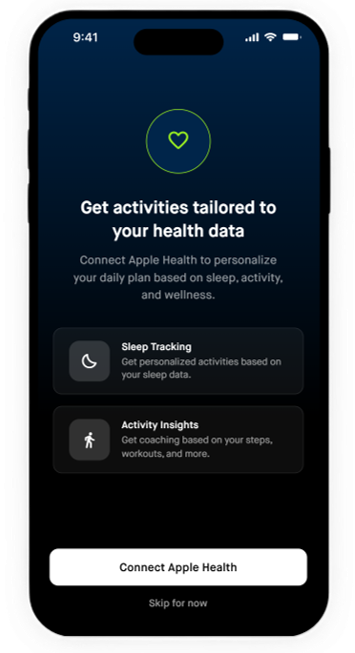
Apple Health. Weight, steps, sleep duration, resting heart rate, and exercise minutes sync overnight to inform the following day's activities.